

One of the more confounding aspects of developing in the SAP space is the lack of good, low-level, helpful instructions. While this post is merely regurgitating information that is readily available elsewhere, it will be done in a manner that (hopefully) will actually be useful to vast majority of ABAP developers out there that, like me, find a lot of SAP’s implementation of web services on the ABAP stack confusing.
Debugging a web service on the ABAP stack of SAP Web Application Server is a very useful procedure to know. Here’s how you do it.
Note: This example is for ECC 5.0
Locate the web service definition in the HTTP Service Hierarchy. There are two ways to do this:
-
-
Option 1:
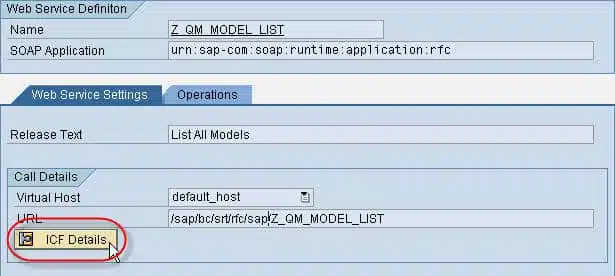
Use transaction WSCONFIG and display the configuration for your web service. Click on the ICF Details button
-
Option 2:
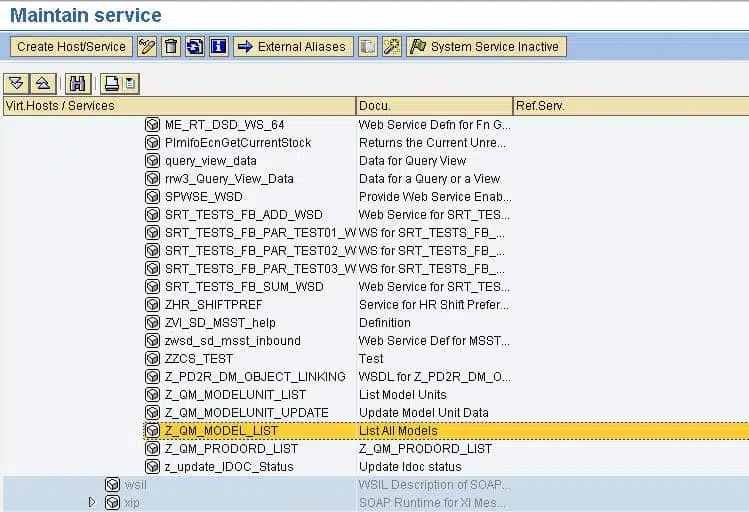
Start transaction SICF. Navigate directly to /sap/bc/srt/rfc/sap for your default host.
Regardless of the method used to get to the service definition for your web service enabled function module, you should have it selected as in this example.
 Next, enable the debugger by selecting the EditDebuggingActivate Debugging menu.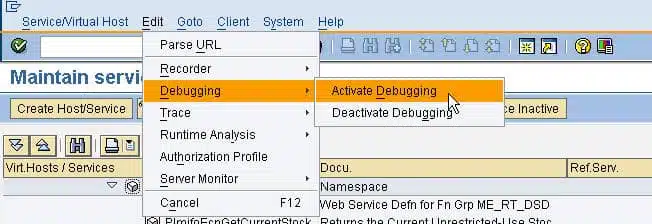
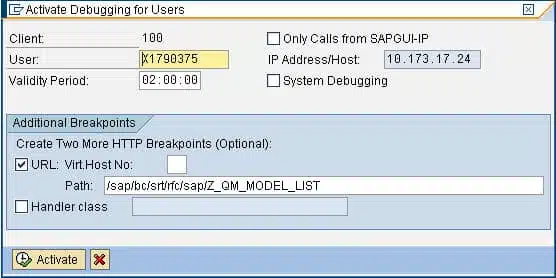
In the ensuing dialog box, confirm the debugging options (the defaults are usually OK).
 To exercise the debugger, test your web service. For this example, I will use the SAP WAS web service test tool, but the application calling the web service can be anything as long as it connects with the debugger’s user ID.
 When the web service is executed, the debugger will start in a new SAPGUI session (make sure you are already logged in via the SAPGUI prior to executing the web service).
 In the debugger, choose BreakpointsBreakpoint atFunction Module from the menu to create a new breakpoint.
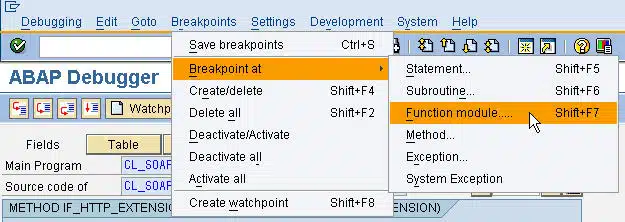 Specify the function module that implements your web service. In the debugger, press F8 to run to your newly created breakpoint.
If the debugger doesn’t get to your breakpoint, the most likely culprit is malformed input XML. Check the payload of the message to ensure that it conforms to the specifications of the web service.
-
Once the debugger has started, it is just like debugging any other SAP application. If you have any specific tips or tricks regarding debugging web services, please share them in the comments section of this blog.


Nice tips Craig, thanks a lot
Excellent Tip. Thanks Craig!
Craig,
we are currently developing some interfaces with SAP utilizing SAP web services. We have had success with their creation and deployment to a web page.
However, one issue I have come up against is trying to test the service, before deploying it to a web page. When I try to test the service, the browser opens to an error page. Does the J2EE server need to be enabled on the SAP system in order to use the test system? I am currently working with our system administrator to enable this functionality.
you are correct, there seems to be scattered bits of info on SAP’s web services on the net.
Regards,
Justin
You brush over the “same username” issue.
How do I find the username of the web service? Without that I am stuck
How do I make them the same. change mine or the WS or both?. I realise this might depend on the situation but you could discuss the pros and cons
Peter
@Peter,
Go to SICF, search for your web service. It will normally be under sap/bc/srt/rfc/sap/ folder. Now double-click the web service. In second tab, rightfully named ” Logon Data”, maintain login information under Logon Data frame.
@Justin,
Without JAVA stack, SAP WAS can’t run Web services.
thankz,
Ajay
Hi,
how do i test my web service.I’m stuck as I cannot debug my ITS.
please suggest
Shobhika
Hi,
I’m trying to create a WebService using just ABAP Stack and when I select “Open Web Service navigator for selected binding” on SOAMANAGER I get error: ” J2EE host or port not specified; define them under “System Settings”.
Also, when I use an external WebService Test Tool I get error: “System.Net.WebException: The request failed with HTTP status 401: Unauthorized.”
Any idea?
AF
Ajay,
Is this true?
“Without JAVA stack, SAP WAS can’t run Web services.”
AF
“Without JAVA stack, SAP WAS can’t run Web services.”
This actually couldn’t be any less true. The Java stack is completely irrelevant to an ABAP Web Service, whether it’s the client or the server portion – we’ve been using them for years with no Java stack involved.
You’re completely right about the lack-of good, low-level and helpful instructions readily available for developers out there, however you’ve hit the nail on the head with this article about how to debug ABAP on SAP WAS, well done!