

The other day I ran into an issue with a test client missing transports in one of my clients QA systems. Upon reviewing the logs I determined that the entire basis team was not on the same page when importing client dependent transports. I now had missing transports and a sequencing issue. Another consultant on the team suggested I use the bulk transport program to clean up the client. Since I was not aware of this program which has been around for quite sometime. I decided that others might find it useful.
This program lets you pick a point in time in one client and synch its configuration changes from that point to another client. The program is RSCC_SCC1_BATCH. You can find more details on the specifics of this program in SAP OSS: Note 645846 – CC-ADMIN: Collective Customizing copy with SCC1.
Program Features:
- Bulk Import Customizing Changes From One Client To Another
- Selections Of SAP Transports By: Transport Number, Owner, Point In Time
- Program Has A Test Mode
- Program Has Ability To Merge Transport Into One New Large Transport
- Program Can Be Schedules To Run As A Periodic Job
The program selection screen is pretty straight forward:

I was most interested in the changes since date. I had performed a client copy on May 19th and was already missing transports by the 20th. There was too much testing setup to redo the client copy so we had to get the configuration corrected.
Results:
- In my testing the program typically runs 600 + seconds.
- SAP suggests you use the Merge Requests: This takes all the request that is selects and merges them into one big request. (Even in test mode it creates the request it just does not import it.)
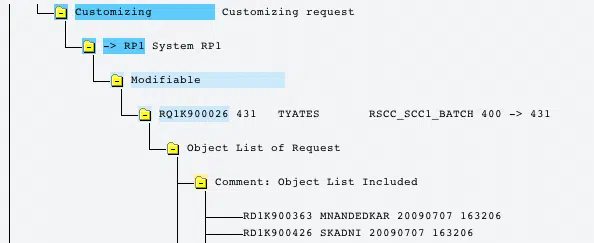
- The merged request contains a list of the merged transports in the comments section.
- I was pulling changes from client 400 (Golden Client in QA) to 431 test client. The transports originated in our development system client 100 so I had to turn off the (Check Request Source Client) Flag
- Configuration was correctly synchronized.
The program creates a spool report:

The report contains summary details of the execution. You can see the number of the newly created merge transport at the bottom.
The merge transport contains the list of merged transport in the comment section:
Transport is not release unless you set the release flag.


Good tips ,this save a lot of testings to be done!
Great article! I have one question:
Is there anyway you can do this between different systems?
For example, our Dev and QAS systems are way out of sync. We have about 100 transports that were released in Dev but have not been transported to QAS yet. There are transports sitting there since our go-live date 2 years ago. Developers and BA’s do not have time right now to go through and look at each one.
Thank you!
Great post!!!
Thank you Tim for this great tip.. Indeed, you are “The best SAP Solution provider”..
Is there any way we can release the config from dev system to only quality system. Did some practice and don’t want to transport data to production?