

Don’t you hate it when you’re trying to view a report as a spreadsheet in SAPGui and it returns a blank workbook? The problem could be due a security settings inside of Excel that is preventing the data from being displayed. It is real easy to fix. Use the following instructions for your version Microsoft Office.
Office/Excel 2003:
Open Excel
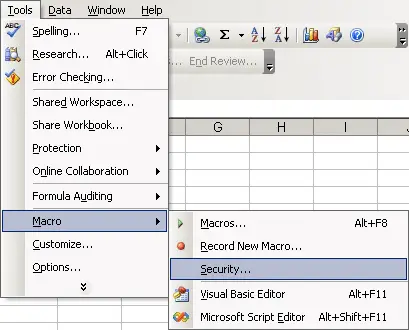
Tools -> macro -> security
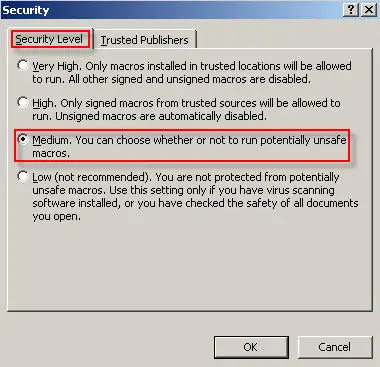
Security Level tab:
make sure level is set to “medium”
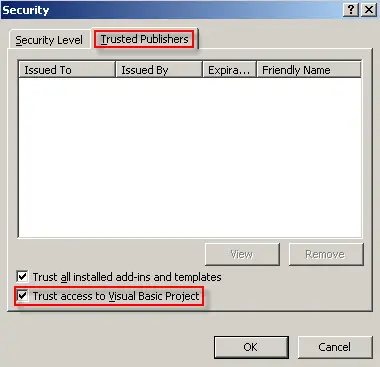
Trusted Sources tab:
Check the box beside “Trust access to visual basic project.”
Office 2007:
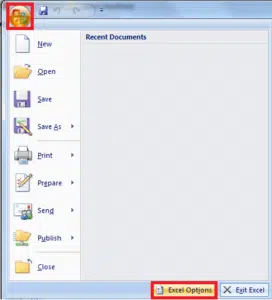
Click the Office button. Click Excel Options.
Click on Trust Center -> Trust Center Settings
Check the box beside “Trust access to VBA project object model”
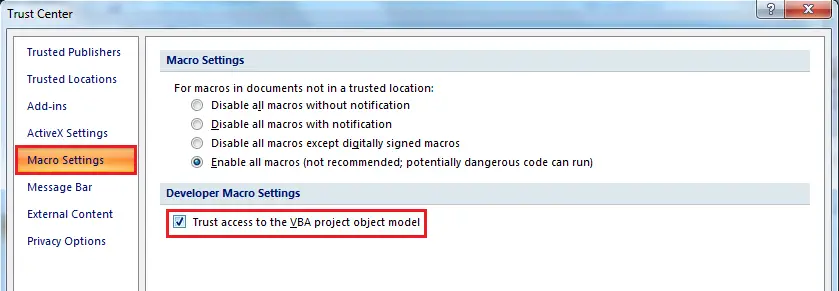
Close Excel and try to view your report again. The workbook should no longer be blank and it should be populated with the correct data.


Doesn’t work for me. Sheets stays empty…
Hi, this doesn’t work for me in Office 2010. It still returns a blank workbook. Any suggestions?
Thanks!
Same thing here. I’m with Excel 2010, the option are like they are suppose to and it’s still blank…
Help?
ALSO having this same problem! Have tried all the different settings. In fact, the user is executing a report and the report will work on one set of data but when executed on another set of data has this problem.
Reproducible every time on each of these data sets.
Help! User is VERY frustrated!
Mara
no solution. . .