

Mass Change of SAP IDOC Status
From time to time it becomes necessary to change the status of SAP IDOCs in SAP. The most common scenario is the requirement to mark SAP IDOCs for deletion. There is no good way to mass mark IDOCs for deletion via the standard IDOC processing transaction BD87. However there is a program that will let you change status.
RC1_IDOC_SET_STATUS
CAUTION: This program should be used with great care and consideration. Improper use of this program can result in data consistency issues. Make sure you know what you are deleting, why you are deleting it, and what is required to correctly update you system after deleting.
Example: Marking IDOCs for Deletion In Mass
It is pretty typical for support users to set the deletion flag on IDOCs that have been incorrectly created and have errored. When there are a small number of IDOCs this is possible via transaction BD87.
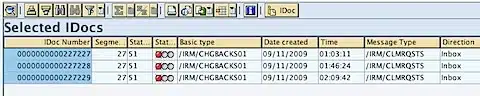
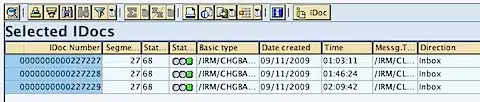
An inbound IDOC in error will have the status 51, when it is marked for deletion it has a status of 68.
A view of the IDOCs to be deleted in WE05.
To mass delete IDOCs run the following program via SE38: RC1_IDOC_SET_STATUS via the SAP Transaction: SE38
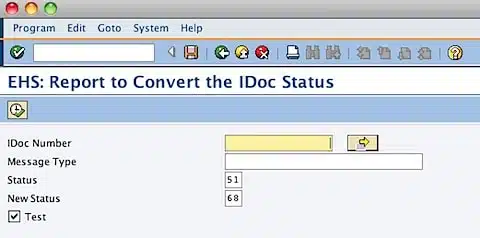
There are only a few parameters on the selection screen for this program. It is most important that you correctly restrict the IDOCs you select with this program. The program automatically defaults to marking inbound IDOCs in error for deletion.
To mass select IDOCs to be marked for deletion select: 
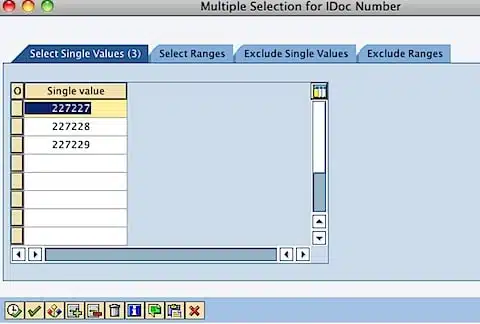
There are many options for selecting and restricting the IDOCs to Mass process. Select by single value or range. Restrict by single value or range.
The  allows you to upload a list of IDOCs from a text file.
The  allows you to apply a list from your clipboard.
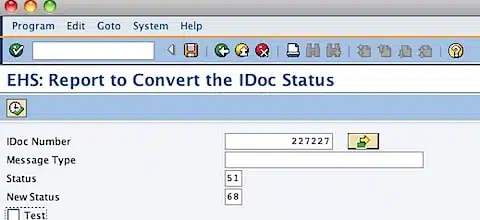
Execute the program 
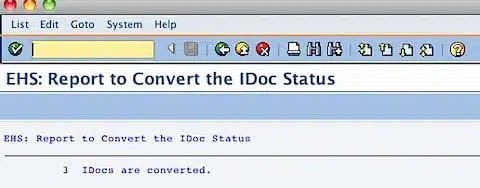
Check the status of the 3 IDOCs in WE05
Example: Changing IDOCs Status To Repost
It is also possible to use this program to reset an IDOC so that it can be reprocessed.
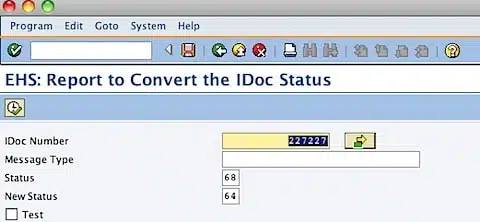
With the following selection we are going to reset the IDOCs with status 68 marked for deletion back to status 64 to try and reprocess them.
Execute the program
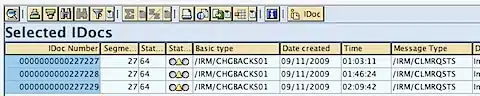
As you can see, program RC1_IDOC_SET_STATUS is very helpful, but please be careful when you use it!



Hi,
Your reading provide me the solution. Thanks!
However, I did not have SE38 or SA38 authorization in production system.
I indeed look for transaction assigned to program( se16 and look in table TSTC) and I had authorization to it.
Just might help other people (my transacction assigned was Z…)
Cheers
Thanks found it useful. While WE11 leans out EDIDC table but a large portion of data also lies in EDIDS, both of these tables related to IDOCs. Is there a way to lean out EDIDS ? Any suggestion welcome. Thanks in advance.
Hi Tim Yates,
thank you very much!!!!
BB
Thanks very much for this article! I found it pretty usefull for our ECC systems.
I am trying to do the same in a BW 7.3.1 system, but I couldn’t find the report RC1_IDOC_SET_STATUS. Any ideas if this report could be copied to BW systems or is there another way of managing mass iDocs in thsi product?
I agree that the RC1_IDOC_SET_STATUS could be used to change the status but as Tim mentioned that this program must be used with very cautions. Reason being that SAP does not provide any checks and balances in this program and hence any status can be changed to any status using this program. You can even change status 51 to status 03 I.e. An inbound status to an outbound status.
To mitigate this issue as well as to take care of number of other critical issues in IDOc management, we have developed a SAP product – Error Message Manager ( EMM ). Details can be found on web site http://www.omksolutions.com under OMKAR LAB tab. To help EDI IDOC community, we are willing to demo it’s functionalities. If any one is interested, please send an email to emm@omksolutions.com
If your objective is to Mass change IDoc status then the SAP standard program RC1_IDOC_SET_STATUS could be used. Few issues with it:
1. You need SE38 or SA38 access to execute the program
2. Program does not have any checks and balances in it. So you can incorrectly change an Inbound IDOC status to outbound status. Program does not restrict the user for making this mistake.
3. If you have number of IDocs for which status to be changed, you cannot use RANGE function on selection.
4. MESSAGE TYPE and IDOC NUMBER fields on selection do not work together. It is EITHER OR condition.
5. You cannot DELETE the IDocs.
So the standard tool-sets provide very limited functionality.
To mitigate this and to bring utmost innovations to IDOC MANAGEMENT are as a whole, there is a really cool product – Error Message Manager (EMM) out there. This product provides Editing, Analysis, Monitoring, Mass Editing, Mass Status change, Mass delete, and a number of other user friendly features.
Please visit website http://www.omksolutions.com OR send an email to emm@omksolutions.com to learn more about it.
Hi Tim,
Its very helpful to us who are new for IDoc’s.
Thank you,keep posting like above………..:)
BR
Sai